Skip to content
  • Home
  • About UgtWorld
  • About Author
  • Privacy Policy
  • เคถเคพเคฏAr
UgtWorld

UgtWorld

Flow of Emotion

  • Artificial Intelligence Free Course
  • Google Explore
    • Career Opportunities
    • Travel and Roaming
    • Physical and Mental Health
    • Sci-Fi
  • เคนเคฟเค‚เคฆเฅ€
    • เคนเคฟเค‚เคฆเฅ€ เคฒเฅ‡เค–
    • เคนเคฟเค‚เคฆเฅ€ เคฒเค˜เฅ-เคฒเฅ‡เค–
    • เคนเคฟเค‚เคฆเฅ€ เค•เคฅเคพ
    • เคนเคฟเค‚เคฆเฅ€ เค•เคตเคฟเคคเคพเคเค
    • เคนเคฟเค‚เคฆเฅ€ เคถเคพเคฏเคฐเฅ€
      • Love Shayari
      • Friendship Shayari
      • Sad-Heartbroken Shayari
      • Motivational Shayari
      • Life Shayari
      • Chai Shayari
      • Khubsurati Shayari
  • เคฎเคฐเคพเค เฅ€
    • เคฎเคฐเคพเค เฅ€ เคฒเฅ‡เค–
    • เคฎเคฐเคพเค เฅ€ เคฒเค˜เฅ-เคฒเฅ‡เค–
    • เคฎเคฐเคพเค เฅ€ เคฒเค˜เฅ-เคฒเฅ‡เค– : เฅจ
    • เคฎเคฐเคพเค เฅ€ เค•เคฅเคพ
    • เคฎเคฐเคพเค เฅ€ เค•เคตเคฟเคคเคพ
    • เคฎเคฐเคพเค เฅ€ เคšเคพเคฐเฅ‹เคณเฅเคฏเคพ
      • เคšเคพเคฐเฅ‹เคณเฅเคฏเคพ โ€“ เคชเฅเคฐเฅ‡เคฎ
      • เคšเคพเคฐเฅ‹เคณเฅเคฏเคพ โ€“ เคชเคนเคพเคŸ
      • เคšเคพเคฐเฅ‹เคณเฅเคฏเคพ โ€“ เคฐเคพเคคเฅเคฐ
      • เคšเคพเคฐเฅ‹เคณเฅเคฏเคพ โ€“ เค†เคฏเฅเคทเฅเคฏ
    • เคฎเคฐเคพเค เฅ€ เคธเฅเคตเคฟเคšเคพเคฐ
  • English
    • Quotes
      • Inspirational Quotes
      • Motivational Quotes
      • Life Quotes
      • Attitude Quotes
      • Love Quotes
      • Happy Quotes
      • Sad Quotes
    • Blogs
      • Social Awareness
      • Motivational
      • Life Lessons
      • Love
      • Friendship
    • Micro Blogs
    • Micro Blogs 2
    • Story
    • English Poetry
  • Banking and Finance
  • The Era of Techno
    • Social Engineering Attacks!
    • Java
      • Introduction of Java, the technological languageโ€ฆ
      • Set-up of Java
    • MySQL
    • Spring
  • Fashion Design
  • Write With Us
    • Suhani’s Write-ups
    • Revathi โ€˜s Write-ups
    • Rachna’s Blog
    • Pooja’s Write-ups
    • Komal’s Write-ups
    • Tanaya Talks
    • AKWrites
    • Rutuja’s Write-ups
    • Samreen โ€˜s Write-ups
    • เคถเคพเคฏAr
      • Marathi Blogs
      • Marathi Story
      • Hindi Blogs
      • English Blogs
      • English Stories
  • Home
  • English
  • Blogs
  • How to create Google Pay account with ATM card?
Blogs English Era of Techno Google Explore

How to create Google Pay account with ATM card?

April 19, 2023October 12, 2023 ugtworld

Know how to create Google Pay account with ATM card?

  • Know how to create Google Pay account with ATM card?
    • To do the same follow the instructions below:
    • How You Can change or remove Your bank account on Google Pay
      • 1. Remove a bank account on Google Pay
      • 2. Change a bank account on Google Pay

In previous blog we grab the information about How to create Google Pay account and how to link bank account with Google Pay . In this blog we will see How to create Google Pay account with ATM card.

Some banks issue an ATM-only card only to be used for the normal functions of an ATM. It is important to know that there are two different cards. The ATM card is a PIN-based card used only for ATM transactions. The debit card, on the other hand, is a more versatile card. It can be used to make transactions not only at ATMs, but also in shops, restaurants and on the Internet.

Hence, you cannot use an ATM-only card to create Google Pay account. However, you can use debit or credit card for the same.

To do the same follow the instructions below:

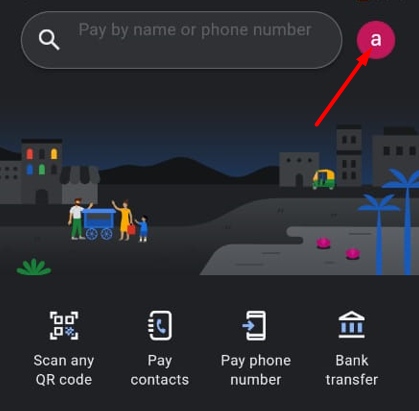
Step 1: Open the Google Pay app and tap on your profile Picture on the top right corner.
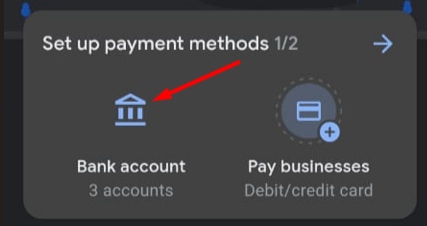
Step 2: Now, click on โ€œBank accountโ€ option and set up payment methods box, click on โ€œadd debit or credit cardโ€.

Only selected visa and MasterCard banks are supported at the moment. You can currently add the following cards:

  • Axis Bank Visa debit or credit card
  • Axis Bank Mastercard debit or credit card
  • State Bank of India (SBI), SBI Cards SBI Visa debit or credit card
  • SBI Mastercard debit or credit card
  • Kotak Bank Visa debit or credit card
  • HDFC Bank Visa debit or credit card
  • HDFC Bank Mastercard debit or credit card
  • IndusInd Bank Visa debit or credit card
  • IndusInd Bank Mastercard debit or credit card
  • Federal Bank Visa debit card
  • Federal Bank Mastercard debit or credit card
  • RBL Bank Mastercard debit or credit card
  • HSBC Bank Visa credit card
  • HSBC Bank Mastercard credit card
  • ICICI Bank Mastercard debit or credit card
  • ICICI Bank Visa debit or credit card
  • One Card Visa credit card

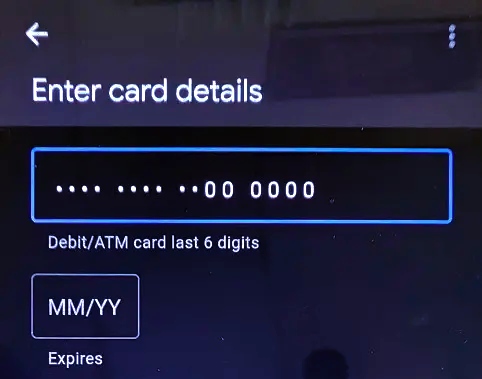
Step 3: Now, enter your Card details and follow onscreen instructions and enter the last digits of the debit or credit card, whichever you are trying to add as a payment method. You will now proceed to create your UPI PIN.
Step 4: Click Create PIN. Create a UPI PIN and enter it again. Now enter OTP. Upon successful OTP verification your debit or credit card will be successfully added as a payment method to Google Pay.
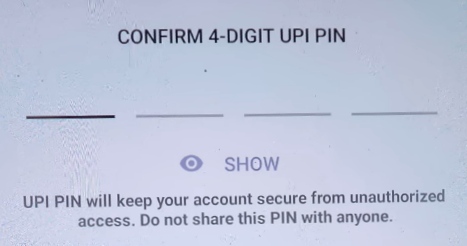
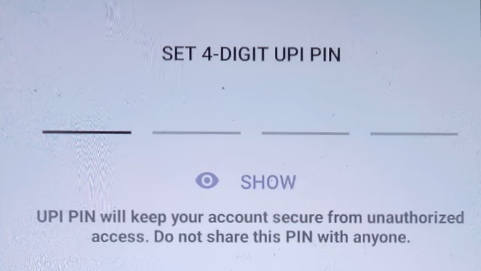
You will need to enter this UPI PIN while performing any transactions hereafter. Do not share this PIN with anyone and keep it confidential.

How You Can change or remove Your bank account on Google Pay

1. Remove a bank account on Google Pay

Step 1: Open the Google Pay app and tap on your profile Picture on the top right corner.

Step 2: Click Bank Account. Tap on the account you want to delete.
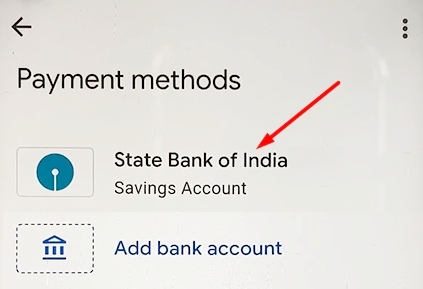
Step 3: Tap More and click Remove account.
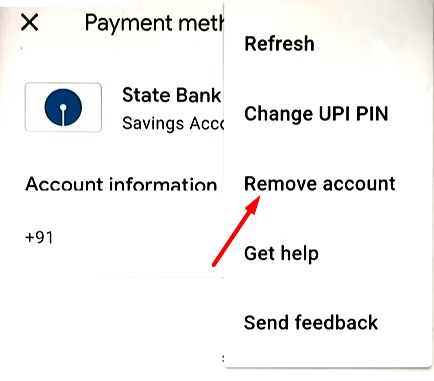
2. Change a bank account on Google Pay

To change or update a bank account, youโ€™ll need to remove it and link it back with Google Pay using the same steps described in previous blog.


While doing payments you have to make sure that you’re sending money to the right person. Cross-check the person’s UPI id or contact number or try to see if the name is correct as given to us. We need to check these small but very important things while making UPI payments.

@TeamUgtWorld

How to create Google Pay account


Click here to read stories
Click here to read poems

Write with usโœ?

Greetings to Everyone from TeamUgtWorld! Anybody who wants to write whatever his/her Heart wants to. They can now publish their content with us on our platform @Ugtworld. For more information click on the following link…


Write with us
0Like
0Love
0Haha
0Shocked
0Sad
0Angry

Related Posts

Manga vs. Comics : Genre beyond the Panel
English Blogs Google Explore

Manga vs. Comics : Genre beyond the Panel?

February 3, 2026February 3, 2026 ugtworld
Essential Language of Fashion Decoding the Speak Chic
Career Opportunities English Fashion Design Google Explore

Essential Language of Fashion: Decoding the Speak Chic

December 3, 2025December 3, 2025 ugtworld

Post navigation

Previous: IFโ€ฆ ELSE  in MySQL.
Next: Error Handling in MySQL

Aapsi Baatchit aur Kissein / เค†เคชเคธเฅ€ เคฌเคพเคคเคšเฅ€เคค เค”เคฐ เค•เคฟเคธเฅเคธเฅ‡

Aapsi Baatchit aur Kissein / เค†เคชเคธเฅ€ เคฌเคพเคคเคšเฅ€เคค เค”เคฐ เค•เคฟเคธเฅเคธเฅ‡
Shop now on Notion Press, Amazon and Flipkart

Write With Us

Write With Us

Follow Us

Copyright ยฉ2026 Ugtworld. All rights reserved.
Proudly powered by WordPress | Theme: Fairy by Candid Themes.
We use cookies to ensure that we give you the best experience on our website. If you continue to use this site we will assume that you are happy with it.