Skip to content
  • Home
  • About UgtWorld
  • About Author
  • Privacy Policy
  • เคถเคพเคฏAr
UgtWorld

UgtWorld

Flow of Emotion

  • Artificial Intelligence Free Course
  • Google Explore
    • Career Opportunities
    • Travel and Roaming
    • Physical and Mental Health
    • Sci-Fi
  • เคนเคฟเค‚เคฆเฅ€
    • เคนเคฟเค‚เคฆเฅ€ เคฒเฅ‡เค–
    • เคนเคฟเค‚เคฆเฅ€ เคฒเค˜เฅ-เคฒเฅ‡เค–
    • เคนเคฟเค‚เคฆเฅ€ เค•เคฅเคพ
    • เคนเคฟเค‚เคฆเฅ€ เค•เคตเคฟเคคเคพเคเค
    • เคนเคฟเค‚เคฆเฅ€ เคถเคพเคฏเคฐเฅ€
      • Love Shayari
      • Friendship Shayari
      • Sad-Heartbroken Shayari
      • Motivational Shayari
      • Life Shayari
      • Chai Shayari
      • Khubsurati Shayari
  • เคฎเคฐเคพเค เฅ€
    • เคฎเคฐเคพเค เฅ€ เคฒเฅ‡เค–
    • เคฎเคฐเคพเค เฅ€ เคฒเค˜เฅ-เคฒเฅ‡เค–
    • เคฎเคฐเคพเค เฅ€ เคฒเค˜เฅ-เคฒเฅ‡เค– : เฅจ
    • เคฎเคฐเคพเค เฅ€ เค•เคฅเคพ
    • เคฎเคฐเคพเค เฅ€ เค•เคตเคฟเคคเคพ
    • เคฎเคฐเคพเค เฅ€ เคšเคพเคฐเฅ‹เคณเฅเคฏเคพ
      • เคšเคพเคฐเฅ‹เคณเฅเคฏเคพ โ€“ เคชเฅเคฐเฅ‡เคฎ
      • เคšเคพเคฐเฅ‹เคณเฅเคฏเคพ โ€“ เคชเคนเคพเคŸ
      • เคšเคพเคฐเฅ‹เคณเฅเคฏเคพ โ€“ เคฐเคพเคคเฅเคฐ
      • เคšเคพเคฐเฅ‹เคณเฅเคฏเคพ โ€“ เค†เคฏเฅเคทเฅเคฏ
    • เคฎเคฐเคพเค เฅ€ เคธเฅเคตเคฟเคšเคพเคฐ
  • English
    • Quotes
      • Inspirational Quotes
      • Motivational Quotes
      • Life Quotes
      • Attitude Quotes
      • Love Quotes
      • Happy Quotes
      • Sad Quotes
    • Blogs
      • Social Awareness
      • Motivational
      • Life Lessons
      • Love
      • Friendship
    • Micro Blogs
    • Micro Blogs 2
    • Story
    • English Poetry
  • Banking and Finance
  • The Era of Techno
    • Social Engineering Attacks!
    • Java
      • Introduction of Java, the technological languageโ€ฆ
      • Set-up of Java
    • MySQL
    • Spring
  • Fashion Design
  • Write With Us
    • Suhani’s Write-ups
    • Revathi โ€˜s Write-ups
    • Rachna’s Blog
    • Pooja’s Write-ups
    • Komal’s Write-ups
    • Tanaya Talks
    • AKWrites
    • Rutuja’s Write-ups
    • Samreen โ€˜s Write-ups
    • เคถเคพเคฏAr
      • Marathi Blogs
      • Marathi Story
      • Hindi Blogs
      • English Blogs
      • English Stories
  • Home
  • English
  • Blogs
  • Google 2-Step Verification
Blogs English Era of Techno Google Explore

Google 2-Step Verification

November 28, 2021July 21, 2025 ugtworld

Why 2-Step Verification is required?

Google 2-Step Verification

In todayโ€™s generation, everyone has a google account either for business use or for personal use. Since we have our personal/business-related data, emails, pictures stored in our emails, drive, google photos. We should keep it secure from any other person or hacker. Google has provided us the 2-step verification to increase the security of our google account.


What is 2-Step verification?

We already have a password for our Gmail account by using which we login into our account. But only using a password is single-step verification for login into google. And if any other person knows our password then he can also log in and check our data. The second step is an extra step from the user confirming that they are trying to login into the account.


How can we enable 2-Step verification?

Following are the steps to enable 2 step verification for our google account.

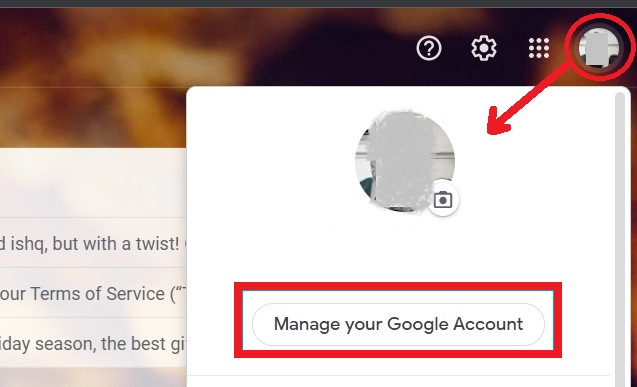
Step1: Once you login into your Gmail account. Click on the profile then click on manage google account as shown in the image.
Google 2-Step Verification

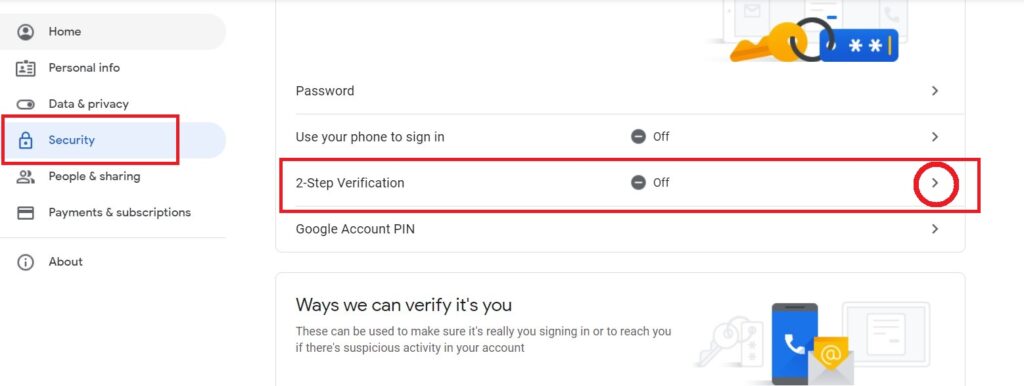
Step2: Go to Security and scroll down you can find the 2-Step Verification option as shown in the below image. To enable it, click on the option.
Google 2-Step Verification

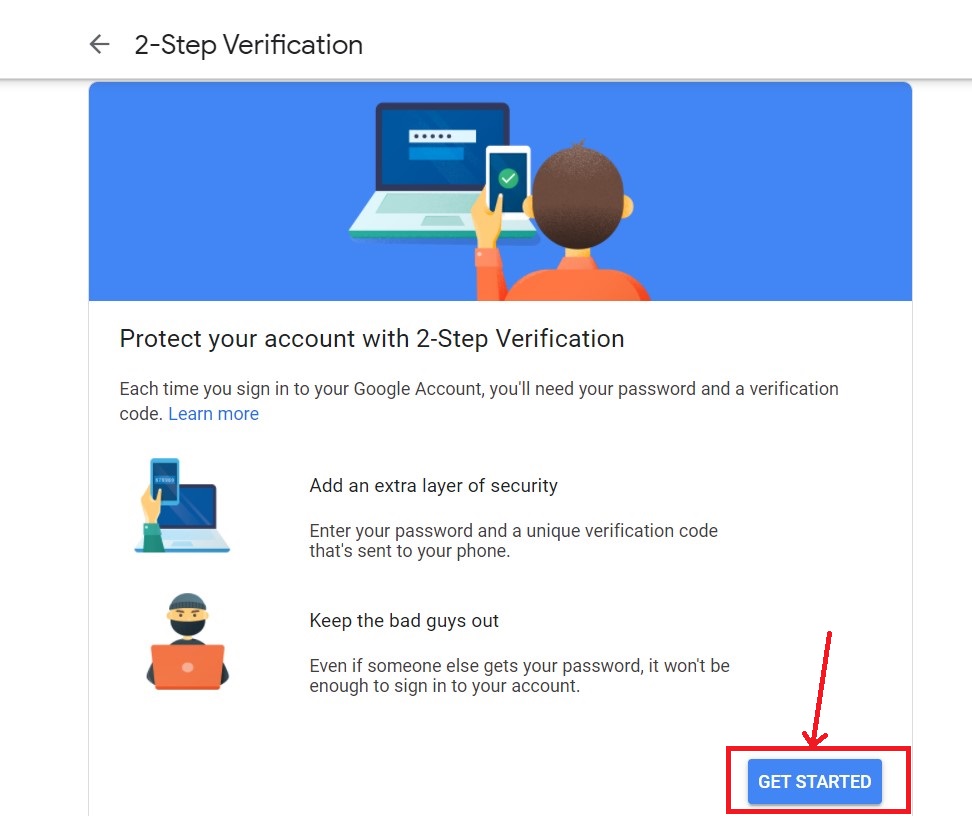
Step 3: Click on get started to enable 2 step verification.
Google 2-Step Verification

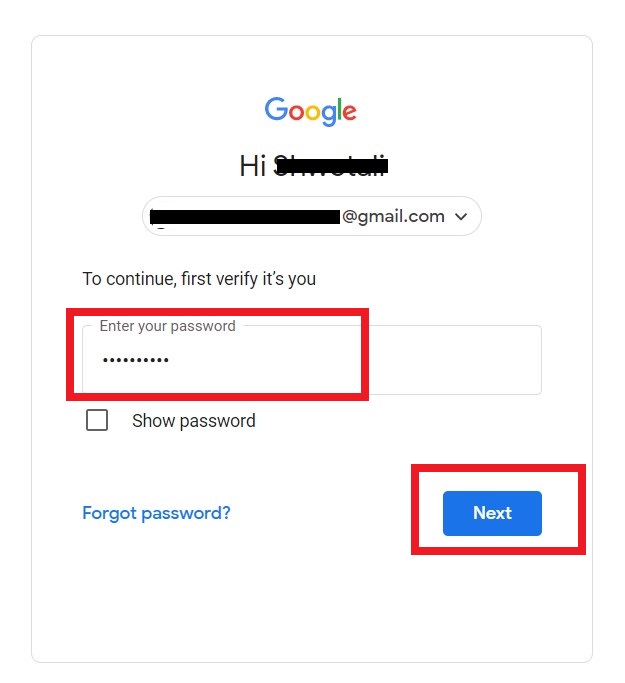
Step 4: Re-login to verify(If asked to re-login) for proceeding further.
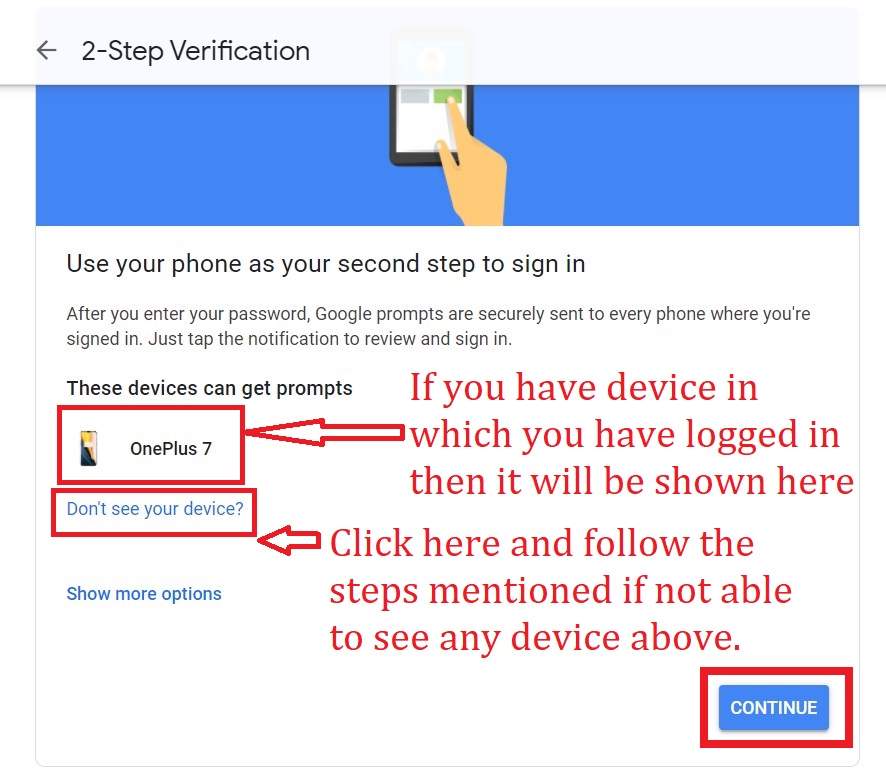
Step 5: check if are able to see your device else click on the donโ€™t see your device. Follow the steps mentioned. Once you login into your device Try again then you will be able to see the device. Click on Continue once the device is visible to the list.
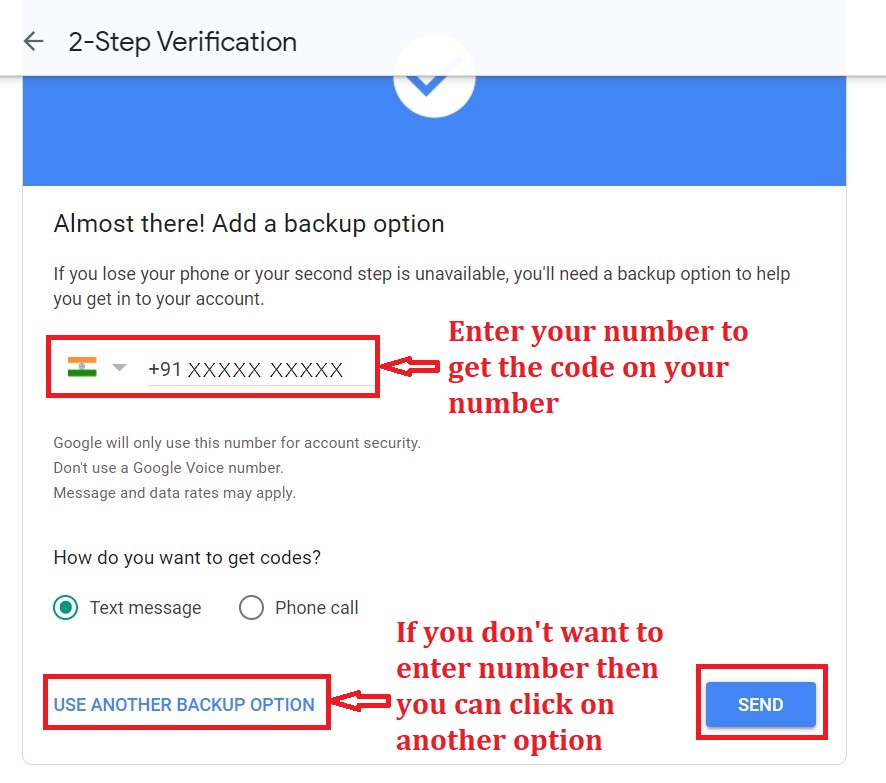
Step 6: Enter your mobile, on which you will get the code. If you donโ€™t wish to share your number then you can click on use another backup option. For another option, Google will provide you a list of backup codes. Make sure you note it down, print or download and save it to a secure place.
Google 2-Step Verification

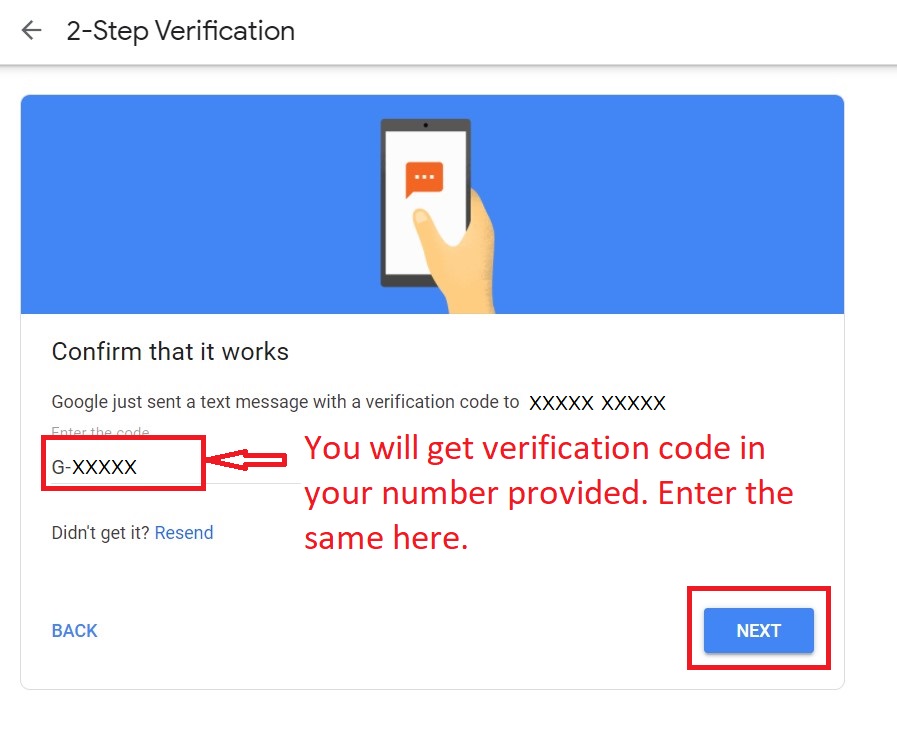
Step 7: Once you click on send you will get code from google as a text message. Enter that code and then click on next as shown below.
Google 2-Step Verification

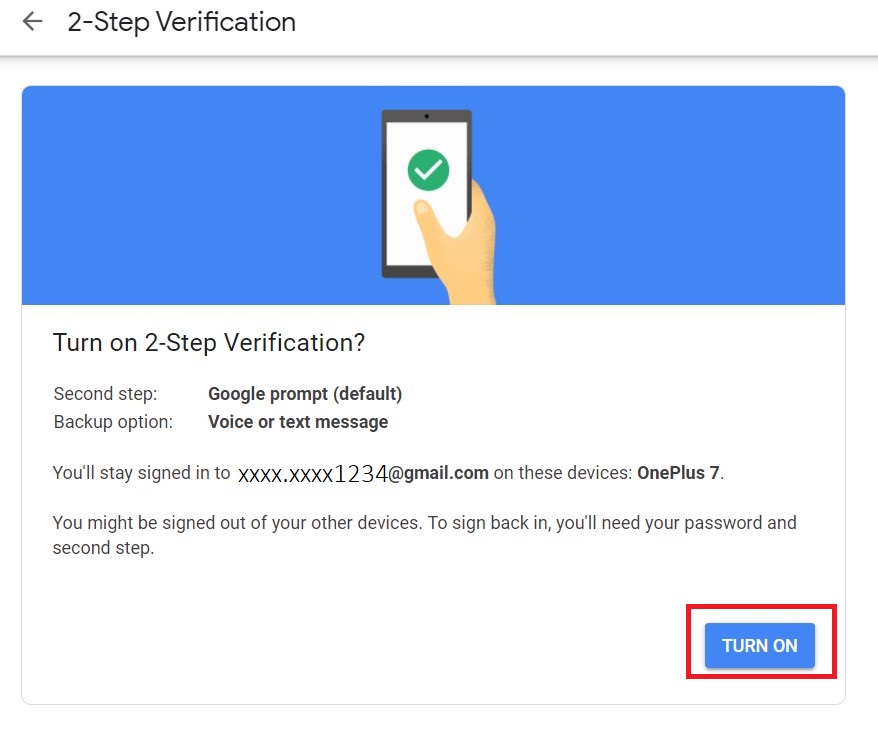
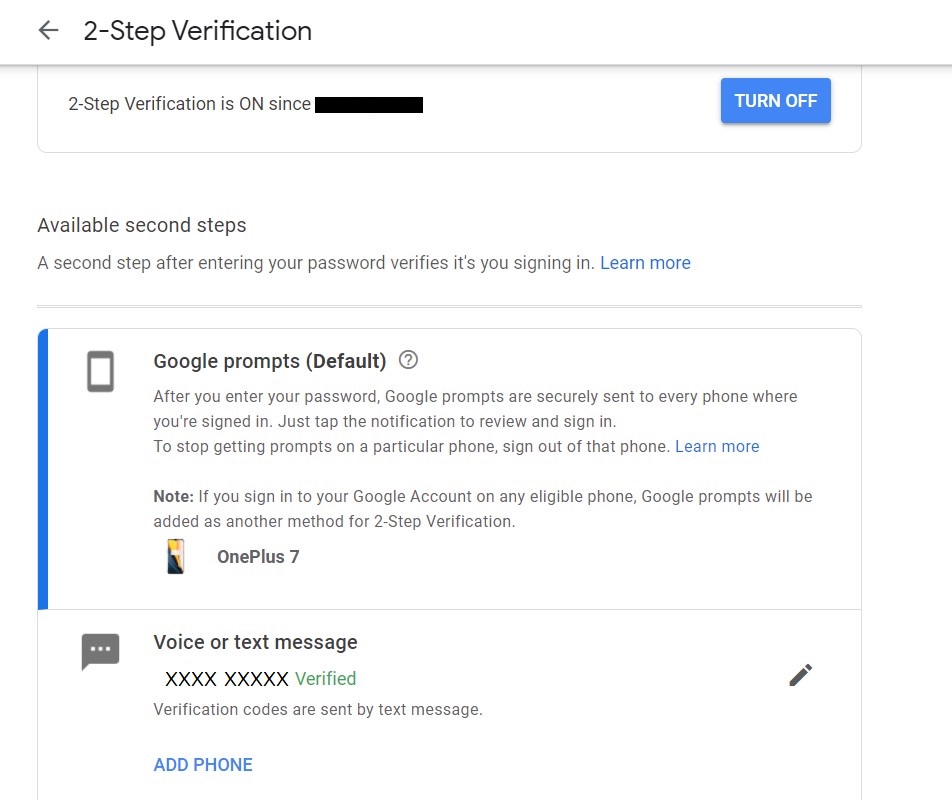
Step 8: Once the code is entered you will get the following window. Click on the TURN ON button.
Google 2-Step Verification

Step 9: After successful completion, you will get the following window.
Google 2-Step Verification

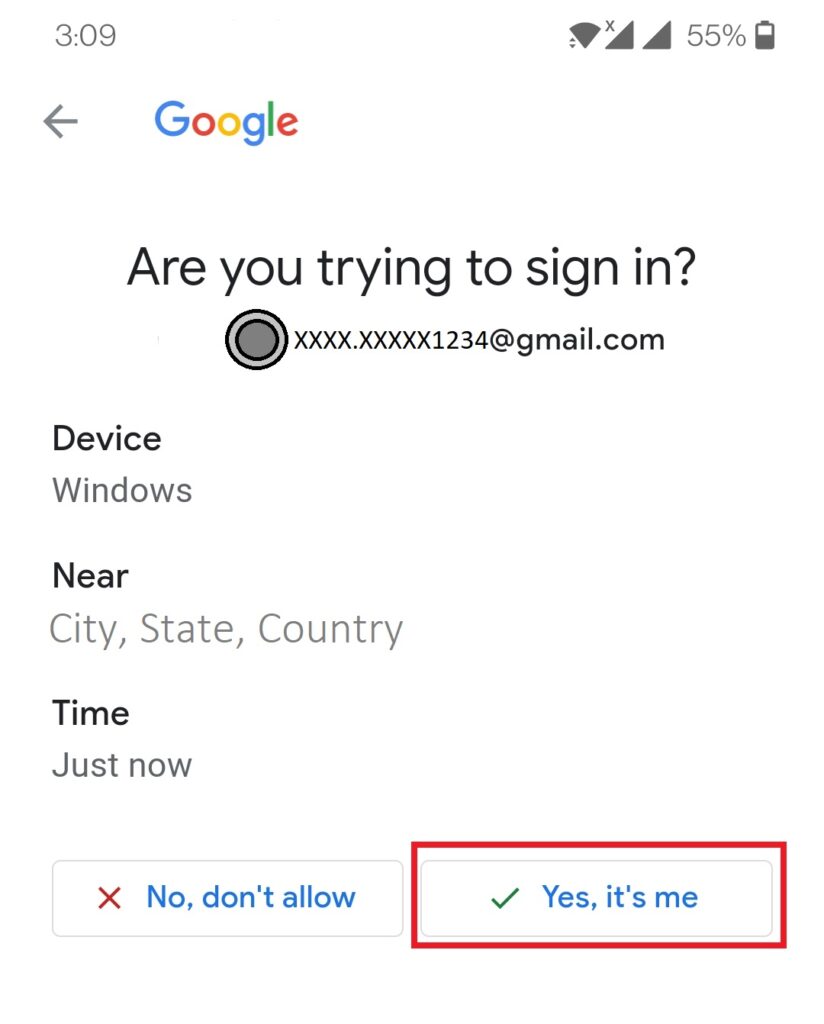
Step 10: Once 2-Step verification is enabled, when you try to login into your account. After entering the password for the second step. You will get a prompt on your mobile device which was selected for second step verification. It will ask for confirmation if you are trying to sign in. Click on Yes, itโ€™s me then you will be able to login into your account successfully.
Google 2-Step Verification

-A blog by Shwetali Khambe

  • UgtWorld
  • Shwetali Khambe
Itโ€™s all about Whatsapp
0Like
0Love
0Haha
0Shocked
0Sad
0Angry

Related Posts

Manga vs. Comics : Genre beyond the Panel
English Blogs Google Explore

Manga vs. Comics : Genre beyond the Panel?

February 3, 2026February 3, 2026 ugtworld
Essential Language of Fashion Decoding the Speak Chic
Career Opportunities English Fashion Design Google Explore

Essential Language of Fashion: Decoding the Speak Chic

December 3, 2025December 3, 2025 ugtworld

Post navigation

Previous: Interface in Java
Next: เค•เคญเฅ€ เคœเฅ€เค•เคฐ เคฆเฅ‡เค–เคฟเค เคฏเฅ‡ เคธเฅเค•เฅ‚เคจ เค•เฅ€ เคฐเคพเคคเฅ‡เค‚

Aapsi Baatchit aur Kissein / เค†เคชเคธเฅ€ เคฌเคพเคคเคšเฅ€เคค เค”เคฐ เค•เคฟเคธเฅเคธเฅ‡

Aapsi Baatchit aur Kissein / เค†เคชเคธเฅ€ เคฌเคพเคคเคšเฅ€เคค เค”เคฐ เค•เคฟเคธเฅเคธเฅ‡
Shop now on Notion Press, Amazon and Flipkart

Write With Us

Write With Us

Follow Us

Copyright ยฉ2026 Ugtworld. All rights reserved.
Proudly powered by WordPress | Theme: Fairy by Candid Themes.
We use cookies to ensure that we give you the best experience on our website. If you continue to use this site we will assume that you are happy with it.